Advanced SystemCare Free 5.3.0.245 لصيانة وتنظيف وتسريع الجهاز

Advanced SystemCare Free 5.3.0.245


 برنامج Advanced SystemCare قم صيانة واحماية واصلاح جهازك مع هذا البرنامج بضغطه واحده
وابقى على جهازك نظيف وسريع وحسن من اداؤه مع هذا البرنامج اطمئن على جهازك
فهو يحميك من ملفات التجسس والسباى وير والفيروسات ايضا بجانب صيانة النظام
برنامج متكامل وحجمه صغير كل هذا واكثر فى احدث اصداراته المجانيه

 Advanced SystemCare Free has a one-click approach to help protect, repair, clean, and optimize your PC. With over 100 MILLION downloads since 2006, this fantastic, award-winning, free PC repair software is a "must-have" tool for your computer. 100% safe with no adware, spyware, or viruses; a PC maintenance program that's incredibly easy to use.


Provides a Complete Solution For PC Top Performance.

•A simple registry cleaner cannot give you true performance boost. Advanced SystemCare Free 5 combines Registry clean, defrag, system tune-up, shortcut fix, privacy sweep, junk files clean, disk fix and optimization, and more, to guarantee your PC run like a new one.
Finds and Detects More Hidden Problems of Security and Performance.

•With our innovative "DEEP SCAN" technology, Advanced SystemCare Free 5 has the highest detection rate in the industry and it is able to find the right root of your PC trouble.
Simpler and Easier to Use.

•You do not need to be a professional or know much about computer. All you need to do is install it and a few clicks will make you enjoy the new PC feeling again.
Proven by More Users.

•Advanced SystemCare is the NO.1 downloaded software in system utilities and has over 10 million users worldwide.
Speeds up PC performance and internet access

•It Tunes up Windows by releasing the built-in power of your system. Dramatically improves both system and Internet performance by up to 400%.
Defends PC security with extra protection

•Detects and analyzes Windows security environment. Scans and removes spyware and adware using up-to-date definition files. Prevents spyware, hackers and hijackers from installing malicious programs on your computer. Erases and updates your PC's activity histories.
One click to solve as many as 10 common PC problems

•Advanced SystemCare 5 inherits the ease-of-use from previous versions, with more powerful capabilities. With one click, it scans and repairs ten PC problems and protects your PC from hidden security threats.
Real-time optimization with ActiveBoost function New!

•ActiveBoost, technology that actively runs in the background intelligently managing system resources in real-time, constantly detecting inactive resources and optimizing CPU and RAM usage.

File Name : asc-setup.exe

File Size : 25.8 MB

Requirements : Windows XP |Server 2003 | Vista |Server 2008 | Win 7

Languages : English | .....

License :  Freeware


للتحميل


LibreOffice 3.5.4 RC 2 حزمة الاوفيس مفتوحة المصدر شبية برامج ميكروسوفت


LibreOffice 3.5.4 RC 2  


File Size : 202 MB

Requirements : Windows XP |Server 2003 | Vista |Server 2008 | Win 7


Languages : English | .....


License : Freeware


تقدم النسخة تحسينات كثيرة على مستوى إصلاح الأخطاء وتحسينات في الكود والميزات الإضافية
أعلنت مؤسسة The Document Foundation عن إطلاق النسخة رقم 3.5 من حزمة برامج أوفيس مفتوحة المصدر LibreOffice، والتي وصفتها بثالث أكبر إصدار للحزمة المطورة اعتماداً على حزمة OpenOffice.
وحزمة LibreOffice مدعومة من شركات كبيرة مثل ريدهات وغوغل، وكانت قد تأسست في العام 2010 من بعض مطوري “أوبن أوفيس” الذي كان يتم تطويره من قبل “صن Sun”، لكن بعد استحواذ أوراكل لم تعجب المطورين طريقة تعامل الشركة مع حزمة “أوبن  أوفيس” التي استغنت عنها وقامت بتسليمها لمؤسسة “أباتشي”.
وقال المطورون بأنهم مع الإصدارة رقم 3.5 قاموا بالتغلب على العديد من العقبات، لكن مع هذا الإصدار قالوا بأنهم صنعوا “أفضل حزمة تطبيقات أوفيس مجانية على الإطلاق”
وبحسب المطورين فقد ورثوا شيفرة مصدرية عمرها 15 عاماً حيث كانت تنقصها العديد من الميزات وتحتوي على العديد من المشاكل التي لم يتم حلها، فكان هدفهم صنع نسخة خالية من الأخطاء وتقدم الكثير من التحسينات والمزيد من الميزات.
وعدا عن إصلاح وتفادي الأخطاء تحتوي النسخة الجديدة على تحسينات في الواجهات ومصحح إملائي باللغة الإنكليزية وزيادة في السرعة وإمكانية استيراد الرسوم من “مايكروسوفت فيزيو”.
وقالت المطورون بأنه تم الاتفاق مع مجموعة من الشركات المصرح لها بتقديم الدعم الفني المدفوع للشركات التي تعتمد الحزمة على أجهزتها، وسيتم الإعلان الشركات المخول لها تقديم الخدمة لاحقاً.
أما بالنسبة لحزمة “أوبن أوفيس” التي شهدت في الفترة السابقة خمولاً نسبياً في التطوير، فمن المتوقع أن تشهد الآن تحسناً بعد أن أعلنت  “آي بي إم” تخليها عن تطوير حزمتها الخاصة “لوتس سيمفوني” المعتمدة على “أوبن أوفيس” أيضاً والالتفات للتركيز على دعم مشروع “أوبن أوفيس” مع أباتشي مع النية بتوفير نسخة تحمل إسم “آي بي إم”

LibreOffice is a comprehensive, professional-quality productivity suite that you can download and install for free. There is a large base of satisfied LibreOffice users worldwide, and it is available in more than 30 languages and for all major operating systems, including Microsoft Windows, Mac OS X and Linux (Debian, Ubuntu, Fedora, Mandriva, Suse, ...).


LibreOffice is a feature-packed and mature desktop productivity package with some really great advantages:
  • It's free no worry about license costs or annual fees.
  • No language barriers  it's available in a large number of languages, with more being added continually.
  • LGPL public license you can use it, customize it, hack it and copy it with free user support and developer support from our active worldwide community and our large and experienced developer team.
  • LibreOffice is an Open Source community-driven project: development is open to new talent and new ideas, and our software is tested and used daily by a large and devoted user community; you, too, can get involved and influence its future development.
LibreOffice gives you high quality:
  • The roots of LibreOffice go back 20 years. This long history means it's a stable and functional product.
  • Thousands of users worldwide regularly take part in beta testing of new LibreOffice versions.
  • Because the development process is completely open, LibreOffice has been extensively tested by security experts, giving you security and peace of mind.
LibreOffice is user-friendly:
  • You get a simple-to-use yet powerful interface that is easy to personalize Microsoft Office users will find the switch easy and painless, with a familiar look and feel.
  • Compatible with all major competitors' file formats. You can easily import files from Microsoft Word, Excel and PowerPoint and many other formats, and can easily save to Microsoft Office and other formats when needed.
  • LibreOffice is supported by a big worldwide community: volunteers help newcomers, and advanced users and developers can collaborate with you to find solutions to complex issues.
  •  


للتحميل


Opera 12.0 Build 1429 Beta المتصفح الآمن والخفيف

Opera 12.0 Build 1429 Beta


اخر اصدار من شركة اوبرا لتصفح الانترنت بسهولة ويسر

Opera is one of the most stable and extremely well optimized browser favored by many Internet users. It is also quite innovative and brought the Net surfing to an entirely new level. It offers tabbed browsing, email support, RSS reader, chats, mouse gestures, turbo, widgets and is fully customizable.


 Personalize

Customize your browser

•You can add, remove or reposition buttons and toolbars or change the entire layout of the browser. It is easy to do … or undo.
Access bookmarks instantly

•The convenient bookmarks bar keeps commonly visited sites and bookmark folders in front of you at all times, allowing instant access. You can enable this toolbar by selecting Opera menu -> Toolbars -> Bookmarks Bar.
Choose your look and layout

•Opera’s vibrant user community has created many beautiful skins and setups for you to try, so you can have a customized look for your browser.
Create your own shortcuts

•Opera offers many ways to perform browser actions, and you can also customize your own keyboard shortcuts, mouse gestures and more.
Tabs

Look inside tabs

•When you hover the mouse pointer over a tab, a preview shows you the content of that page. When you stack tabs, hovering over a stack also shows a preview of the tabs within, and you may select the tab you want to use.
Recover tabs you closed

•You can open tabs that you accidentally closed or website pop-ups that Opera blocked by clicking the closed tabs icon to the right of your tabs.
Protect a tab from closing

•By right-clicking a tab, you can pin it to prevent it from being closed by accident. Pinned tabs take up minimal space and are automatically moved to the left of other tabs to make them easy to find.
Get a better view of tabs

•Visual tabs show a small thumbnail for each website, in addition to the page title and icon. You can drag the tab bar to the desired height to adjust the thumbnail size accordingly.
Save sets of tabs

•You can save your open tabs as a “session” and load it later to open these same pages. You can have multiple sessions and load each one based on what you are doing at a certain time.
Productivity

Stay in control of downloads

•Download files more quickly. As soon as you click a file to save it, the Opera browser starts downloading it, so there is no wasted time. From the Downloads tab, you can keep track of the progress of downloads and even pause and resume them as needed.
Follow your favorite feeds

•Subscribing to newsfeeds with Opera Mail is simple. Just click the RSS link in the address field, click “Subscribe”, and the feed will display under “Newsfeeds” at the bottom of your Mail panel. Now, you can get your RSS feeds right in the browser without using a separate program.
Keep your spelling in check

•The spell checker in Opera shows a red line under misspelled words anywhere you can enter text on a webpage. Corrections can be chosen by right-clicking the misspelled word.
Eliminate distractions

•You can block images, pop-ups and plug-ins that you do not want to see. Right-click a page, choose “Block Content” and click any annoying elements to disable them selectively. In the Opera browser, smart pop-up blocking is turned on by default.
Manage bookmarks efficiently

•Give your bookmarks easy-to-remember names or group them into folders to help manage your bookmarks as your collection grows.
Load plug-ins only when needed

•You can choose to have plug-ins such as Adobe Flash load content only when clicked. This is helpful to speed up browsing on computers that have difficulty handling lots of plug-in content.
Use convenient apps

•Opera Widgets are apps that provide handy functionality such as showing the weather, quickly looking up information or providing entertainment and games. There are many Opera Widgets available, and they run directly on the desktop, so they keep running even if you close your browser.
Download using BitTorrent

•Support for BitTorrent is built in to Opera, so you can download torrents without the need for a separate application. You can even monitor the progress of large torrent downloads with Opera’s Downloads panel.
Search

Search from the address field

•Save time by typing your search query directly into the address field. You can also customize this feature by choosing the search engine you prefer.
Get suggestions as you search

•Search suggestions predict queries as you type, making searching quicker and easier. Google search predictions are now built into the Opera browser, along with Wikipedia, Bing and Yandex suggestions. These are displayed when using the search field or when using search keywords in the address field. For example, to see Google’s search predictions, type “g search words” in the address field.
Use any search engine instantly

•It is easy to use your favorite search engine whenever you want—from the search field, the address field or even the context menu. You can also add any search engine. Simply right-click in the search field of a search engine’s website and select “Create Search”.
Find what you need in webpages

•“Find in page” is brilliant in Opera. All matching results are highlighted, so they are clearly visible. You can fine-tune your search to match all the text, just the whole word or only the links or the page. This feature can be accessed from keyboard shortcuts such as [.] (period) for text and [,] (comma) for links.
Smart options for wrong addresses

•We’ve all mistyped a web address from time to time. Now, the Opera browser gives you smart options from an error page that lets you search with your entry and gives you suggestions you can click to find the page you want.
Latest Technologies

The fastest JavaScript engine

•The Carakan JavaScript engine has been further enhanced to run more quickly than ever! This makes Opera the fastest browser on Earth in many performance tests. Even complex webpages load and run with lightning speed.
Support for the the latest HTML5

•With our latest Opera Presto rendering engine and its leading support for HTML5, websites using the latest web standards work perfectly. The Opera browser supports technologies that enable sophisticated web apps and multiplayer games, and the latest CSS3 such as linear gradients and multiple columns display beautifully.
Smooth and fast graphics

•Everything in the Opera browser is drawn on your screen using Opera’s high-performance Vega graphics library. This enables super fast and smooth graphics, in everything from tab switching to animation on webpages.
Support for geolocation

•You can share your location with geolocation-supported websites such as Google Maps. Rest assured that your privacy is a top priority—you will always be prompted before sharing your location.
Security and Privacy

Be safe on the Web

•The Opera browser features up-to-the-minute information from leading security agencies on exploits, viruses and phishing scams. When you visit sites on the Web, Opera checks this data in real time and warns you when a site is identified as dangerous. In addition, Opera supports Extended Validation certificates (EV) to provide added assurance and trust for secure websites.
Keep your browsing private

•Using a private tab or window ensures that evidence of your browsing history is removed as soon as the tab or window is closed. Now, it is safer to do your banking from a public computer or easier to plan that surprise vacation.
See your security on websites

•An enhanced address field makes it easy to stay safe on the Web. The complexity of long addresses is hidden to make it clear which site you are visiting. A colored badge also indicates the quality of encryption that is used; clicking it gives you detailed information about the site.
Control website cookies

•Opera allows you to choose which cookies you accept or reject. For example, you can allow for different set-ups for different servers.
Stay up to date

•Opera makes it easy to have the latest version of not just the browser, but any extensions and Opera Unite applications you are using. You can have completely automatic updates or be notified when an update is ready for you to install. As always, with Opera, it is your choice.
Developers

Enjoy integrated debugging

•Opera Dragonfly is our integrated debugging environment. Inspect the DOM, CSS, and network traffic and data stores, troubleshoot your JavaScript and take advantage of our unique remote debugging functionality.
Learn the latest web technology

•Dev.Opera hosts articles and discussions on the latest in web technology. Join in and stay in touch with the direction of tomorrow’s Web.
Make your site shine in Speed Dial

•Opera’s popular Speed Dial feature supports beautiful high-resolution icons for sites. To make your site look its best in Speed Dial, learn about how to optimize websites and their icons.

File Name : Opera_1164_int_Setup.exe

File Size : 11.4 MB

Requirements :Windows XP |Server 2003 | Vista |Server 2008 | Win 7

Languages : English | .....

License : Freeware


للتحميل


Maxthon 3.3.9.800 beta متصفح رائع وآمن وخفيف برابط مباشر

Maxthon 3.3.9.800 beta


متصفح رائع يقوم بفتح عدة نوافذ اي صفحات ويب متعدة في نافذة واحده او نافذة متصفح واحده ويستعمل القليل من مصادر النظام بحيث يصبح خفيف على الجهاز وذو قدرات رائعة يعتمد على محرك بحث إنترنت اكسبلورير فالذي يعمل في متصفح IE هو نفسه الي يعمل على متصفح Maxthon لكن هنا في هذا المتصفح يعمل بالعديد من المميزات الاضافية فهو كفؤ بالفعل البرنامج من شركته يضمن لك سرعة في التصفح وتخفيف الحمل على الكمبيوتر فإذا كان الانترنت معك بطيء هذا المتصفح يساعدك على ان يكون الانترنت سريع معك كما يقوم بترتيب العديد من الاخطاء التي توجد في المتصفحات الاخرى يعمل على تصليح العديد من الامور وهو رائع بالفعل وحل مشاكل الصور والاخطاء الاخرى

وأيضا لا نحتاج الى تنصيب الفلاش بلاير من اجل مشاهدة الفيديو من المواقع مثل اليوتيوب وغيره

بصراحة متصفح جامد جدا فيه كل المميزات اللي انت عاوزها زي السرعة و الامان و عدم وجود فيروسات

خفيف للاجهزة المتواضعة و يعمل علي كل انواع الويندوز

Maxthon has created the fastest browser around . It's very easy to use, simply download the browser and you're good to go.The only  browser designed for the whole web. Dual display engines (powered by Trident and Webkit) andthe web's fastest Javascript engine (V8) make every website sing --- fast.


Super Fast

•Maxthon has created the fastest browser around, with an engine that draws web pages 200% faster than Google Chrome. Try it youself and then tell a friend. Not sure? See what others say about the speed of Maxthon.
Easy and Simple

•It's very easy to use, simply download the browser and you're good to go.  Check out our video tutorials if you want to make a quick jump to power user.
Exclusive Features

•Securely stores your bookmarks and notes on the internet for anytime anywhere access; Share clippings with the built-in Screen Grab; Download YouTube videos to watch later and so much more...

File Name : mx3.3.8.1000.exe

File Size : 24.7 MB

Requirements :Windows XP |Server 2003 | Vista |Server 2008 | Win 7

Languages : English | .....

License : Freeware


للتحميل


PORTABLE 


مجموعة الادوات الهامة لصيانة وتسريع الجهاز TweakNow PowerPack 2012 4.1.8


TweakNow PowerPack 2012 4.1.8


وهي عبارة عن مجموعة متكاملة من المرافق التي تمكنك من ضبط كل جانب من جوانب نظام تشغيل الكمبيوتر
ومتصفح ويب. وحدة Registry Cleaner توفر لك طريقة آمنة وبسيطة لتنظيف سجل ويندوز.
للحفاظ على جهاز الكمبيوتر الخاص بك دائما على أعلى أداء،
نوصي لتنظيف السجل الخاص بك على الأقل مرة في الشهر.
لعشاق التغيير والتبديل في ويندوز، وتوفر هذه المجموعة أكثر من 100 ضبط ويندوز مخبأة في الجزء السري ويندوز.
باستخدام الوحدات المدرجة في هذا القسم، يمكنك بسهولة تخصيص ويندوز مثل المهوسون به.
وحدة Virtual Desktop تتيح لك تشغيل ما يصل إلى أربعة تكوينات سطح المكتب مصمم خصيصا في وقت واحد،
مما يتيح لك تصميم شاشة الكمبيوتر حسب مزاجك ومتطلبات العمل الخاص بك.
أخيرا وليس آخرا، فإن الجناح يتيح لك ايضا على صورة كاملة لجميع جوانب أجهزة الكمبيوتر،
بما في ذلك معلومات مفصلة عن اللوحة الأم، المعالج، بطاقة الفيديو والذاكرة والقرص الثابت والشبكة.
TweakNow PowerPack is a fully-integrated suite of utilities that let you fine-tune every aspect of your computer's operating system and Web browser. The Registry Cleaner module provides you with a safe and simple way to clean Windows Registry.


For Windows tweaking lovers, the suite provides more than 100 hidden Windows settings in the Windows Secret section. Using modules included in this section, you can easily customize your Windows like geeks do.

The RAM Idle program manages the free memory that is available to run Windows programs. It prevents performance from degrading as you swap files and programs in and out of memory.

The AutoShutdown program lets you suspend, hibernate, or shut down your computer after a specified period of time. In addition to saving resources, this program keeps your system more secure by making it unavailable to unauthorized people. The CD AutoRun is an extension of Windows CD and DVD autorun features, giving you additional options for starting programs or listening to music.

The Virtual Desktop module lets you run as many as four custom-designed desktop configurations simultaneously, allowing you to tailor your computer screen to your mood and your work requirements.

Last but not least, the suite also gives you a complete picture of all aspects of your computer's hardware, including detailed information about your motherboard, processor, video card, memory, hard disk and network.

File Name : PowerPack415.exe

File Size : 10.2 MB

Requirements :Windows XP |Server 2003 | Vista |Server 2008 | Win 7

Languages : English | .....

License : Freeware


للتحميل

Any Video Converter 3.3.9 لتحويل ملفات الفيديو المجانى

Any Video Converter 3.3.9


برنامج Any Video Converter Free هو أداة الفيديو الكل في واحد مع تحويل سهلة الاستخدام واجهة رسومية ، وتحويل سريع سرعة ونوعية ممتازة الفيديو. انها تسمح لك لتحويل ملفات الفيديو بين جهد كل شكل ، مجانا! فإنه يمكن تحويل تقريبا جميع صيغ الفيديو بما في ذلك الافلام ، كسفيد ، MOV ، RM ، RMVB ، MPEG ، VOB ، DVD ، WMV ، AVI الى MPEG - I ، MPEG - I ، DVD NTSC و PAL DVD ، فلاش للفيديو (FLV) ، وافي الفيديو حسب الطلب وصيغ WMV الفيلم. اي محول الفيديو يجعل من السهل على أي شخص من التمتع بأي شكل الفيديو مع الهاتف ، أو لاعب المحمولة PSP MP4. كما أنها تدعم أي مستخدم تعريف تنسيقات ملفات الفيديو والإخراج. ولديه سرعة لا مثيل لها وجودة عالية. هناك برمجيات المصدر المفتوح لتنفيذ كل مهمة تقريبا لتحويل الفيديو. ولكن إذا كنت واحدا من هؤلاء المستخدمين النوافذ الذين يبحثون عن وسيلة الفيديو الكل في واحد مع تحويل سهلة الاستخدام واجهة رسومية ، أي تحويل الفيديو تنص على أنه للتو ، مما يسمح لك لتحويل ملفات الفيديو بين جهد كل شكل ، على مجانا!

اي محول الفيديو يجعل دفعة تحويل ملف بسيط. إنشاء قائمة دفعة من أي أشكال مختلفة وتحويلها إلى تنسيق كل واحدة مختارة. سيتم حفظ الملفات المحولة إلى مجلد الدليل محددة مسبقا والملفات الأصلية سوف تبقى على حالها.

ميزات محول الفيديو ما يلي :
• واجهة سهلة الاستخدام التي هي سهلة الاستخدام.
• تحويل جميع صيغ الفيديو MPEG - I ، MPEG - I ، DVD NTSC و PAL DVD ، فلاش للفيديو (FLV) ، فيديو حسب الطلب وافي WMV صيغ الفيلم.
• دفعة تحويل أي صيغ الفيديو بما افي ، WMV ، محامون بلا حدود ، ميلا في الغالون ، MP4 ، الخ.
• دعم DivX و XviD افي الشكل واستيراد وتصدير الفيديو
• فيديو الافتراضي الدعم / إعدادات الصوت أو معلمات المستخدم المخصصة للفيديو والصوت.
• هل الخيار لمعاينة الفيديو في الوقت الحقيقي قبل التحويل.
• التحويل الأسرع في العالم الفيديو بسرعة مذهلة مع الفيديو وجودة الصوت.
• يدعم العديد من ضبط الفيديو / خيارات الصوت لملفات MP4. على سبيل المثال ، والفيديو / الصوت معدل العينة ، ومعدل بت ، حجم الفيديو...
Any Video Converter - Freeware - is the most renowned free video converter for converting video files between various formats, including AVI, MP4, WMV, MKV, MPEG, FLV, 3GP , DVD, WebM , MP3, etc for iPad 2, iPod, iPhone, Android, PSP, Samsung Galaxy S II, Amazon Kindle Fire. Burn videos to DVD disc with fast speed and excellent quality.
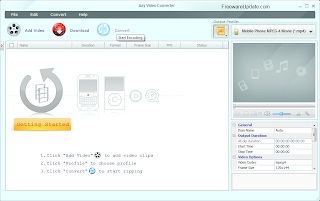
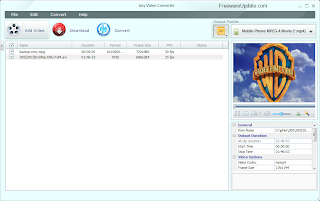
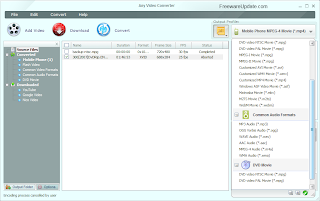


Main Features :

•Multiple Input Formats
◦Support a wide range of video formats including AVI, FLV, MOV, MP4, MPG, M2TS, MTS, RMVB, AVCHD, MKV, WebM(V8), QT, WMV, VOB, 3GP, 3GPP2, DivX, and more.
•All Devices Playable
◦Perfect transfer video to PC, laptop, Tablets, Apple iPad, iPod, iPhone, Sony PSP, MP4 players, Zune, HTC, Android, BlackBerry, Nokia, Xbox, Smartphones, etc.
•YouTube Video Downloader
◦Download FLV, MP4, WebM, 3GP videos in bulk from YouTube, convert YouTube videos to AVI, WMV, M2TS, MKV, MP3, etc and burn YouTube videos to DVD.
•Powerful Video Editing
◦Trim video clips, crop video, rotate video, join video, add subtitles, edit video codecs, dimension, bit rate, frame rate, sample rate, channel, video/audio quality.
•DVD & Blu-ray Burning
◦Burn videos to a CD, DVD+R, DVD+RW, DVD+R Dual Layer, DVD-R, DVD-RW, DVD-R Dual Layer, and Blu-ray DVD disc that can be played back on PAL and NTSC TV.
•Fast & Friendly
◦Quickly convert and burn multi-files simultaneously in batch. Realize multi-threading video conversion. Auto shutdown computer when conversion finished.
All-in-One Free Video Converter

•There is open source software to perform almost every task for video conversion. But if you are one of these windows users who are looking for an All-in-One video converting tool with easy-to-use graphical interface, Any Video Converter Freeware provides just that, allowing you to effortlessly convert video files for FREE!
Free Video to Video Converter

•Whether you are looking for free AVI video converter, free MKV video converter, free FLV video converter, free MP4 converter, free iPad converter, free Android converter, or free YouTube converter, Any Video Converter Freeware is the right application for you. Download the free video converter now to convert videos and experience better digital life.
Free Video to Audio Converter

•Any Video Converter Freeware is also a free video to audio converter that can extract audio from video, like convert MP4 to MP3, convert MPEG to M4A, convert AVI to MP3, convert WMV to WMA, convert MOV to AAC, convert WebM(V8) video to MP3, and VOB to MP3.
Free YouTube Video Downloader

•This free YouTube Downloader lets you download videos from YouTube and save them as MP3, MP4, WMV, MPEG, MKV, WebM, ASF, M2TS, DVD and other formats.
Supporting a wide range of video formats

•Convert video between different formats
◦Convert all kinds of video formats, including MOV, M2TS, OGM, RMVB, RM, WMV, QT, WebM, FLV, MOD, TS, TP, DVR-MS, Divx, etc. to AVI, WMV, MP4, MPEG-1, MPEG-2, FLV, SWF, MKV, 3GP and 3G2 for all kinds of portable media players including iPod, iPhone, PSP, Zune; mobile phones including Google Nexus One, BlackBerry and Nokia and game consoles including PS3, Xbox360 and Wii. Click HERE to learn about the supported input formats and click HERE to learn about the supported output devices.
•Extract audio from videos
◦Convert video to audio formats including MP3, WMA, M4A, OGG, WAVE and AAC.
•Take snapshot from videos
◦Take snapshot from playing video and save as .PNG picture format, create your own picture collections from movies.
•High-Definition video converter
◦Served as a high-definition video converter, Any Video Converter Freeware allows you to convert AVCHD (*.M2TS, *.MTS, *.TOD), HD MKV, HD H.264/MPEG-4 AVC, HD MPEG-2, HD MPEG Transport Stream (*.TS, *.TP, *.M2T) and other high-definition video formats to standard definition video formats. Besides, high-definition video output formats including AVI, WMV, MP4 and MKV (720P & 1080P) are also available. Convert HD video from your HD camcorder and camera.

Downloading YouTube videos

•Built-in YouTube video downloader and YouTube video converter
◦Paste URL links of your favorite YouTube videos to the program, download to your hard drive and convert to video formats you need. Downloading only or downloading and converting are available. YouTube login feature is also built-in.
•Choose YouTube video quality
◦YouTube videos are now available in a range of quality levels, such as standard quality (SQ), high quality (HQ) and high definition (720p, and 1080p HD) (Read details...). This free YouTube Downloader allows you to specify the quality level under menu option Edit > Option > Online Video.
•Additional online video sharing site support
◦Besides, the program can download and convert videos from Google Video and Japanese NicoVideo.
•Add "Flatten and add Faststart to MP4 files" to enable MP4 streaming
◦This program adds the MP4 Faststart option to play back MP4 video in the stream way. With this function, you can upload the converted MP4 videos to the online video-sharing websites such as YouTube. While the video has been uploaded to the website, the video can be played before the entire video will be downloaded.
Editing videos easily

•Merge multiple files into one
◦Despite the formats of the videos, you can join multiple video files into a singe long video.
•Clip any segments as you like
◦Help you to cut multiple segments in a video by setting start point and end point as you like. Or trim a section of the video by setting start time and end time.
•Crop frame size to remove black bars
◦Crop frame size to remove black bars and retain what you want only. You can either use intuitive drag-and-drop cropping window or set crop area size, left margin and top margin to achieve the goal.
•Personalize your video with special effects
◦Adjust the brightness, contrast, saturation, rotate or flip your video, add artistic effects like noise or sharpen to make your video different and special.
•Add your own subtitle to output video
◦Prepare a .srt subtitle with your own dialogue and embed it into output video, set encoding, position, size and font for your own subtitle.


Burning video to CD, DVD, and Blu-ray disc

•Choose DVD output format 
◦You can unfold Output Profile, choose Burning to DVD from the list, and then choose DVD video NTSC Movie or DVD video PAL Movie according to your TV system.
•Support burn video to multiple playable DVD formats
◦The program supports burning video to CD-R, CD-RW, DVD-RAM, DVD+R, DVD+RW, DVD+R Dual Layer, DVD-R, DVD-RW, DVD-R Dual Layer, random access writes, Blu-ray media, Blu-ray Rewritable media.
◦Note: If you need to add DVD menu and background music and image to your DVD, please go for Any Video Converter Professional version.
•Easy to use
◦Just with a few clicks, you can burn your desired videos to CD/DVD, so you can save or enjoy the videos freely!
Easier operation and management

•Unique output video management panel
◦Manage your output videos by profile or group with a file calculator. Show or hide the file management panel in one click.
•Unique output profile management panel
◦Disable or enable any output profile as you like. Keep your commonly used profiles in the front.
•Batch video adding and converting
◦Batch add video files in different folders easily with a folder selection dialog. Batch convert video files to output profile you specified and auto shutdown after encoding is also available.
•Completely customizable parameters
◦Embed useful pre-defined options to choose and completely customize frame size, video bitrate, audio bitrate by manually entering a value.
•Process priority and multi-processing
◦Set process priority from idle to realtime, support multi-processing from 0 to 8, offer you best speed to convert videos.
•Multilingual user interface
◦User interface of Any Video Converter Freeware covers 20 languages including English, Germany, French, Japanese, Simplified Chinese, Traditional Chinese, Arabic, Spanish and Portuguese.

File Name : vc-free.exe

File Size : 28.1 MB

Requirements : Windows XP |Server 2003 | Vista |Server 2008 | Win 7

Languages : English | .....

License : Freeware


للتحميل


Kingsoft Office Suite Free 2012 8.1.0.3032 الاوفيس العملاق المجانى

Kingsoft Office Suite Free 2012 8.1.0.3032


يتمتع بجميع ميزات البرمجيات
المكتبية الحديثة التي تتوقع مع نسق النموذج الطباعي المألوف التي تسمح تنفيذها في المنزل ،
في العمل أو في أي مكان .

Kingsoft Office Suite Free 2012 is an office suite that offers a number of features for creating, viewing and editing personal and business documents. Kingsoft Office 2012 includes Kingsoft Writer, Kingsoft Presentation and Kingsoft Spreadsheet. These three reliable and versatile programs are perfect for both personal use at home and for professional businesses. They offer outstanding value at their listed cost compared to competing office programs.


Kingsoft Office 2012 is compatible with all of the latest Microsoft Office file formats. It will easily open, read and write documents created with Microsoft Office as well as a wide variety of other formats. Microsoft Office can also open Kingsoft files without having Kingsoft Office installed on the same computer.


Main Features :

Better and Deeply Compatible with Microsoft Office Suite

•Open, edit and save Word files : (97/2000/2003/2007/2010) .doc, .docx.
•Open, edit and save Excel files: (97/2000/2003) .xls, .xlsx.
•Open, edit and save Powerpoint files: (97/2000/2003) .ppt, .pptx.
Bulit-in PDF Converter

•Save files including Writer, Spreadsheets, Presentation as PDF format.
•Convert Kingsoft Writer, Spreadsheet, Presentation to PDF files.
•Open and convert Microsoft Word (.doc, .docx), Excel (.xls, .xlsx), PowerPoint (.ppt, .pptx) to PDF files.
Automatic spell check

•Provide a built-in spell checker you can use to proofread your document.
•Mark the incorrect words in red underlines when typing.
•IProvide some recommended words to help in improving your document.
Multiple document tabs

•Avoid the hassles caused by switching between multiple document windows.
•The tab bar that appears above the editable area allows you to switch between documents quickly and conveniently.
Small data package

•The install package is just 70MB, which is only one-tenth the size of other office software.
•The software installs within just one minute.
•Although it is really small, it includes Writer, Spreadsheet and Presentation to meet your daily needs in office work and document processing.
Document encryption

•Provide a document encryption function which can set a password to files.
•Set a password to open and edit documents.
•Enter an open password to only browse the document but not modify it. Enter an edit password to both browse and modify the document.
•Protect privacy to prevent others seeing or changing the files.
•Humanized table operation
•Quickly select and move tables by clicking the shortcut operations on the table.
•Add additional rows and volumes by clicking shortcut operations on the table.
Share files via email

•View and edit email attachments by Kingsoft Office.
•The built-in emailling function makes it easy to share documents.
What's new in Office Suite Free 2012

•New: Automatic spell checker. A built-in spell checker will automatically proofread the text you enter as you create your documents.
•New: Activate and update the software online.
•Improved: A new and improved layout allows for much quicker document processing compared to previous versions. Editing the layout, finding and replacing words and inserting pictures are only some of the processes improved by the new layout.
System Requirements for Kingsoft Office Suite Free 2012

•Required Operating System: Windows 2000/Windows XP/Windows Vista/Windows 7
•Basic Configurations:
•CPU: Pentium II 266 MHz or higher
•Memory: at least 128 MB
•Hardware: at least 200 MB available space
•Recommended Configurations:
•CPU: Pentium III 450 MHz or higher Memory: 256 MB or larger
•Hardware: 250 MB available
•Kingsoft has devoted over two decades to the development of user-friendly software, customer-oriented services and the best office software.

File Name : office_suite_free_2012.exe

File Size : 51.4 MB

Requirements : Windows XP |Server 2003 | Vista |Server 2008 | Win 7

Languages : English | .....

License :  Freeware


للتحميل


Advanced Installer 9.2 لانشاء ملفات التنصيب للبرامج

Advanced Installer 9.2


برنامج رائع في انشاء ملفات التثبيت

سهل الاستخدام
واجهة سهلة
Advanced Installer is powerful and easy to use Windows Installer authoring tool. Install, update and configure your products safely, securely and reliably.


MSI

•Create valid MSI setups for your applications respecting all written and unwritten Windows Installer rules.
UAC

•Build installers that run flawlessly on Windows 7/Vista supporting their security model.
Upgrades

•Detect and upgrade older version of your product installed on the user's machine. Prevent installs over newer ones.
Side-by-Side

•Create packages for different versions of your application that can be installed simultaneously and run side by side.
Imports

•Import from Visual Studio, InstallShield LE, WiX, Eclipse, Inno Setup, NSIS and regular MSI/MSM packages.
Fonts

•Register fonts in the Windows OS. Specify registration names for non-TrueType fonts.
Environment Variables

•Create, append or prepend user or system environment variables.
Autoregister

•Auto registration, for files that support it, can be scheduled at install time.
Files and Folders

•Install and uninstall files and folders. Set attributes, create shortcuts.
Registry

•Install and uninstall registry keys and entries.
64-bit

•Build setups that run and install on 32-bit processors or on the latest 64-bit Intel and AMD CPUs.
Template projects

•Create templates based on your current project and ready-to-use for your future projects.
Add/Remove

•Customize your application's listing in the "Add/Remove Programs" page of Control Panel.
XML projects

•They can be easily checked into a version control system and shared between multiple developers.
Command Line

•Build your release packages in completely automated scripts, like Make, Ant or NAnt.
Run&Log

•Launch your MSI package while pretty printing the full Windows Installer log.
Launch Conditions

•Visually specify conditions necessary (applications, frameworks, etc.) for your package to run.
Smart Formatted Editing

•Editing (MSI)Formatted fields offers reference auto-completion, syntax and error highlights and resolved value hints.
Per-User/Per-machine

•Create installers that can be install as required: per-user or per-machine if the user is Administrator.
Include Merge Modules

•Include frameworks, libraries and other prepackaged dependencies into your installers with just a few mouse clicks.

File Name : advinst.msi

File Size : 42.3 MB

Requirements : Windows XP |Server 2003 | Vista |Server 2008 | Win 7

Languages : English | .....

License : Freeware


للتحميل


>